How to Organise Volunteers for a Club Event: a Step-by-Step Guide
From the first shift plan to the thank-you after the event — with practical tips and how to do each step in the Clubhand app.
A club show, a village festival, a food stand at the local fair: most clubs depend on volunteers, and most organizers spend far more time chasing helpers than planning the event itself. This guide walks through a process that works, whatever tool you use. For each step I also show how it works in Clubhand, the app I built for exactly this job.
Step 1: Work out what you actually need
Before asking anyone, write down the positions and the times they need to be covered:
- Positions: bar, kitchen, cash desk, entrance, set-up, tear-down.
- Time span: when does each position open and close? Don't forget set-up the day before and tear-down afterwards.
- People per position: two at the bar, three in the kitchen during peak hours.
- Shift length: three to four hours is a good default. Shorter shifts are easier to fill; longer ones mean fewer hand-overs.
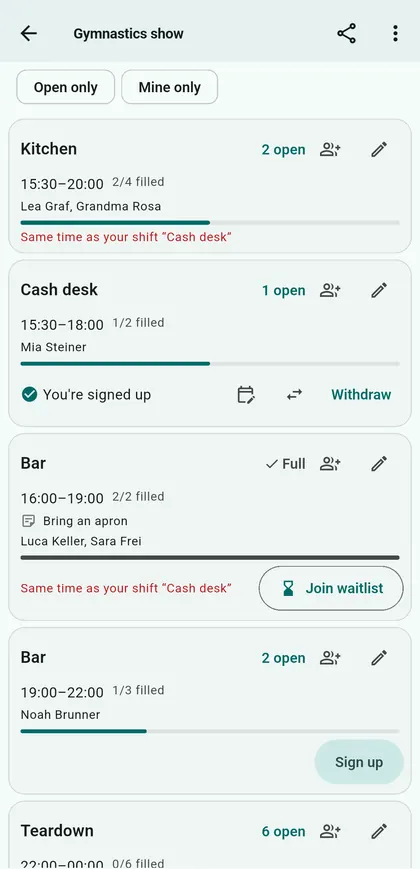
In Clubhand: tap New event, enter date and place, then add shifts. Instead of entering each shift by hand, give a position, the time span, the length per shift and the number of identical positions — "Bar, 6 pm to 2 am, 4 hours, 2 people" becomes the full set. Group positions into areas (bar, kitchen, entrance) to keep larger events readable. For events over several days, set times per day.
Step 2: Decide who may sign up for what
Not every shift is for everyone. The cash desk may need someone experienced, the youth group may only help until 10 pm.
In Clubhand: each shift can be limited to certain groups or teams ("Who can sign up?"). If you want to approve sign-ups, switch on Confirm sign-ups — for the whole event or a single shift. Helpers then ask, and you confirm or decline.
Step 3: Set deadlines
Two dates make an organizer's life much easier:
- a sign-up deadline, so you know early enough where gaps remain;
- a withdrawal deadline, so nobody quietly drops out the evening before.
In Clubhand: set both in the event settings, as a number of days before the event.
Step 4: Publish and share — including people without the app
The biggest mistake is to rely on one channel only. Use every channel your helpers already use, and make signing up as easy as possible.
In Clubhand: tap Publish. Members see the event in the app and get a push notification. For everyone else, open the share sheet:
- a helper link you can post in the group chat, newsletter or on your website;
- a QR poster (PDF) to hang up in the gym, the clubhouse or the bakery.
Outside helpers sign up in the browser without an account and get a confirmation e-mail with a cancel link.
Step 5: Watch the gaps, not the list
The question isn't "who signed up?" but "where is someone still missing?".
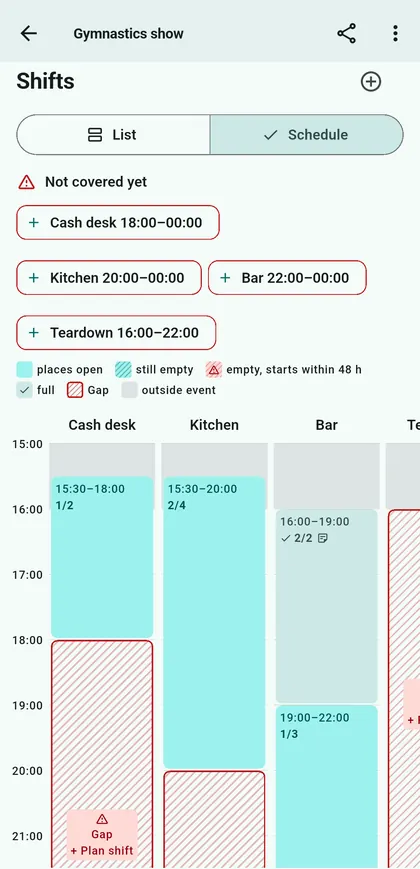
In Clubhand: the schedule view shows one column per position with time running down, so gaps stand out. Filter by Open only to see what remains. Organizers can assign people directly to a shift. When a shift is full, others can join the waitlist and move up automatically if a place frees.
Step 6: Remind people
People don't forget out of bad will — they forget because the event was weeks away when they signed up.
In Clubhand: members get a reminder before their shift and can subscribe to a calendar with all their shifts. Helpers without the app get a reminder e-mail. If someone can't make it, they hand over their shift: they stay on it until someone takes it over, and if there's a waitlist, the next person moves up right away.
Step 7: Check in on the day
Knowing who actually showed up matters for the event itself and for the year-end overview.
In Clubhand: helpers check in on site with the event's QR code or six-digit code, from an hour before their shift. Organizers see attendance per shift and can mark no-shows.
Step 8: Say thank you — and keep the numbers
After the event, thank your helpers by name. A short post on the club board goes a long way.
In Clubhand: post the thank-you on the board; everyone gets a push. Export the helper list as CSV if your treasurer or committee needs it. With the Club Plus plan, statistics show hours, shifts and places filled per year, compared with last year, and required volunteer hours track each member's target and reported hours.
Step 9: Make next year easier
Write down what worked: which shifts were hard to fill, where you had too many people, when the rush came.
In Clubhand: Save as template. Shifts with their times, areas, bring list and participation questions are stored — no people. Next year, the event is ready with one tap. You can also duplicate an event or copy a single day.
Checklist
- Positions, time spans, people per position and shift length written down
- Restrictions and approval decided
- Sign-up and withdrawal deadlines set
- Event published in the app, link shared, QR poster hung up
- Gaps checked a week before and filled
- Reminders sent
- Check-in on site
- Thank-you posted, numbers kept
- Template saved for next year
Try it with your next event
Clubhand is free for clubs with up to 30 members and one published event per year, with unlimited helpers without the app. Larger clubs pay from CHF 190 per year for the whole club; members and helpers never pay. You can try a sample club without creating an account.
More about Clubhand
- Clubhand: a volunteer shift app for clubs — what the app does, who it's for and what it costs
- Clubhand questions answered — price, privacy, helpers without the app, ClubDesk and Webling
Also on Medium: How to Organise Volunteers for a Club Event: a Step-by-Step Guide